Feature Release: Introducing Kling 3.0 Omni on THANKYOU AI

At Thank You AI, we are committed to providing our users with the most powerful generative tools in the industry. Today, we are proud to announce the official integration of Kling 3.0 Omni — the latest evolution of the Kling video model series, built around a new philosophy: AI video as structured, editable footage rather than one-off generations.
This update brings native 4K resolution, scene-based multi-shot generation, and a sophisticated motion engine to our platform, allowing you to create high-fidelity, production-ready video content directly from text or image prompts.
Start Generating with Kling 3.0 Omni
What Sets Kling 3.0 Omni Apart From Earlier Generations Of Kling
Previous generations of Kling were all about bettering pure motion quality, and how well audio visual aligned. With Kling 3.0 Omni, there's a new direction. Instead of looking at each version of Kling as an independent piece of footage, Kling 3.0 Omni creates structure (duration), allows for editing (primitives), and lets you plan, create and edit your video in a way you would direct a scene, rather than by just using a random prompt.
There are three fundamental ways Kling 3.0 Omni works:
- Structured Storytelling: Multi-shot scenes with controlled pacing
- Persistent Identity: Characters, clothing and other props stay consistent throughout time
- Cinematic Realism: Motion follows physical laws, not random chance
Native 4K Resolution and Quality Video Generation
The single most significant advancement in Kling 3.0 Omni is that it can generate video at native 4K resolution. In contrast to traditional AI models which are forced to upscale their output, Kling 3.0 Omni generates high density pixel data from the beginning. This results in high-quality images with crisp edges, clarity and professionalism.
- Micro Detail Precision: The ability to capture detailed texture such as skin pores, fabric weave with great precision
- Cinematic Depth: Improved light/shadow algorithms provide a sense of depth to each scene much like expensive movie production equipment
- Macro Shot Fidelity: The ability to maintain texture and fine detail in close-up shots — makes Kling 3.0 Omni perfect for product demonstrations and material studies
Scene-Based Multi-Shot Generation
Scene-based multi-shots are one of the most compelling new features of Kling 3.0 Omni. The ability to create a single video consisting of 2–6 different scenes allows creators to define exactly what occurs within each scene, as well as assign a specific duration to each of these segments.
A maximum of 15 seconds total for a video, with scene lengths ranging from 3 to 15 seconds, provides flexibility for creating connected sequences that move at a deliberate pace (i.e., they do not feel stitched together). Additionally, this feature enables the creation of cohesive mini-stories, ads, and episodic content based on a single prompt.
This is a fundamental distinction between a clip-generating model and a true scene-generator.
Start and End Frame Control
Another critical advancement in Kling 3.0 Omni includes start/end frame control, which was unavailable in previous iterations. Now, creators have the option to define the starting and ending frames of a generation, or use an end frame to provide guidance to the model's motion resolution.
These options enable creators to match their generated footage to existing assets, or maintain continuity between shots without generating the entire sequence. For iterative workflow processes, having frame-level constraints significantly decreases the amount of randomness created by the model and gives creators a greater degree of predictability in controlling the behavior of motion.
Technical Advancements in Kling 3.0 Omni
The technical advancements made in the Kling 3.0 Omni architecture include enhancements in understanding of movement, identity and consistency over time:
1. Temporal Stability & Character Consistency
Temporal attention was added to the Kling 3.0 Omni to improve temporal stability (stability of character, object, and backgrounds) throughout the entire length of a video. In addition, faces will be consistently presented in every frame; facial expressions will evolve smoothly; clothing and accessories will continue to be present and not "drift" during a scene. Also, Kling 3.0 Omni has greatly improved the chances of avoiding some of the most common artifacts experienced in AI-generated video, specifically flicker and morphing. Therefore, Kling 3.0 Omni enables using your models for AI Influencers, Recurring Personas, and Narrative-Driven Content.
2. Physics-Based Motion
Physics-based motion is a key area of focus for Kling 3.0 Omni – creating realistic interactions of physics between subject movement and camera movement. For example, whether it is the way water flows, the way hair moves in the wind, or the natural walk of a human being, motion is consistent through time in all areas including scenes with impacts or other complexities of interaction.
3. Element/Subject Management
You can add multiple subjects to one scene – additional people, products, etc. – and Kling 3.0 Omni will keep track of each individual element, its presence and identity throughout the video, along with maintaining the spatial relationship(s) between them. This feature is very important for Branded Content, Product Storytelling, and Multi-Character Narrative applications where continuity provides protection to brand assets.
4. Directed Camera Behavior
With Kling 3.0 Omni, camera behavior will be Directed. It follows prompts and behaves in an intentional manner unlike the previous version of Kling 3.0 where camera movements were completely random. With this new version of Kling 3.0 Omni you will have control over camera pan, tilt, tracking shots, and zoom with cinematography-level accuracy.
5. First Class Native Audio & Multilingual Lip-Sync
Audio is created as part of the scene creation process, not as an afterthought. Once audio is enabled, Kling 3.0 Omni creates motion and sound simultaneously, taking into account micro sounds, environmental texture and dialogue alignment. Multilingual Lip-Sync capability will allow you to tell who speaks what when and in what language even in a single conversation.
6. Professional Color Grading
Experience greater color depth and more accurate color representation. The model has been trained on cinematic data so that your final output will be visually balanced to a high level of quality and ready for professional use without needlessly requiring post processing.
How to Use Kling 3.0 Omni on Thank You AI
Kling 3.0 Omni is now available to all users on our platform. To begin generating cinematic video:
- Navigate to the Video Generation dashboard: Access Video Tools Here
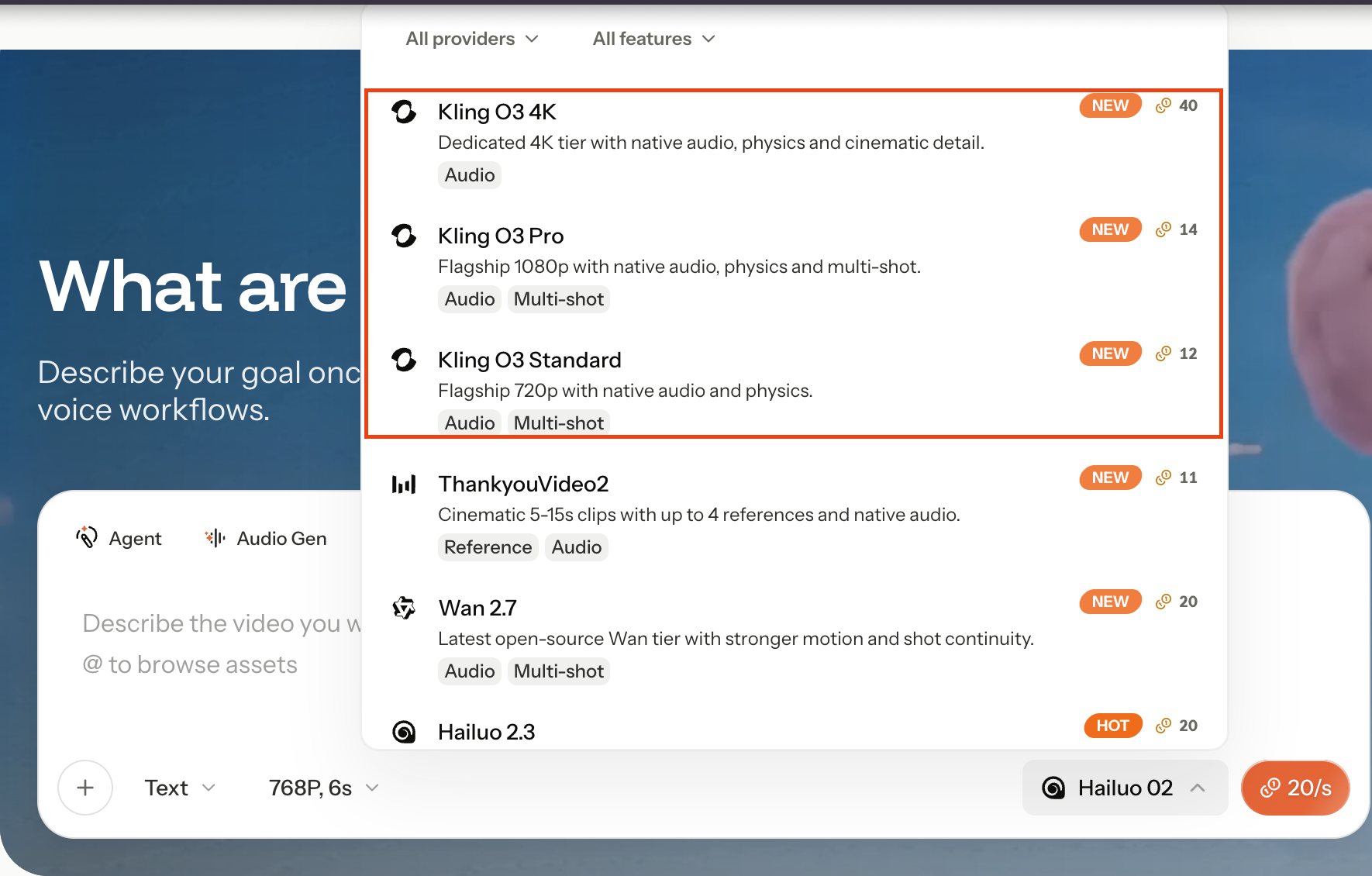
- From the model selection dropdown, select Kling 3.0 Omni.
- Define your scene structure (1 to 6 scenes), describe what happens in each, and assign duration per segment.
- Apply start and/or end frame constraints for tighter motion control.
- Choose your aspect ratio and toggle the 4K Resolution setting to ensure maximum output quality.
- Generate, refine, and export.
Start Generating with Kling 3.0 Omni on THANKYOU AI
Crafting Cinematic Prompts for Kling 3.0 Omni
To get the most out of native 4K generation, treat every prompt like a director's shot card. Kling 3.0 Omni rewards specificity and structure over abstract description — the more precisely you stage a scene, the more the model can deliver on its 4K fidelity, motion realism, and continuity.
The Five-Layer Prompt Framework
Layer your prompts in this order for the most predictable results:
- The Setting — location, time of day, lighting condition, atmosphere
- The Cast — who is in the scene, with consistent descriptors (clothing, age, build) reused throughout
- The Beats — actions broken into a clear sequence, not stacked into one sentence
- The Camera — shot type (wide, medium, close-up), movement (push-in, orbit, tracking), and transitions
- The Sound — dialogue with explicit speaker attribution, ambient layers, and tone of voice
Avoid abstract qualifiers like "beautiful" or "amazing" unless paired with concrete detail. Long prompts are not a problem — what matters is logical order, not brevity. For multi-shot scenes, write your prompt as a mini storyboard — Kling 3.0 Omni was built for exactly this workflow.
Sample Prompts to Get You Started
1. Cinematic Multi-Shot — Rooftop Conversation
Shot 1: A wide shot of a rain-slicked rooftop garden at twilight, neon city skyline glowing in the distance. A young woman in a charcoal trench coat stands near a glass railing. The camera slowly dollies forward.
Shot 2: Cut to a medium close-up of a man in a dark sweater approaching with two glasses of wine. He says quietly, "You finally came up here."
Shot 3: Over-the-shoulder from behind the man as the woman turns and replies, "I needed to see the city from somewhere quiet."
Soft ambient wind, distant traffic hum, warm tungsten accent lighting, natural skin tones, native 4K detail on fabric textures.
2. Multi-Character Café Scene
Interior of a wood-paneled café on a foggy morning, condensation forming on the windows.
The barista (early 30s, apron) calls out brightly: "One oat latte, one drip — both ready."
The woman in a mustard scarf, picking up her cup, leans toward her companion: "I haven't been here since college."
The man across from her, smiling: "Then we're long overdue."
Camera alternates between medium shots and tight close-ups, soft espresso machine hiss, gentle cutlery clinks, native 4K resolution.
3. Multilingual Dialogue — Barcelona Tapas Bar at Night
A bustling tapas bar tucked into a narrow lane of Barcelona's Gothic Quarter, warm pendant lights, copper-topped counter glowing under candlelight, wine bottles lining the wooden shelves behind the bar.
The bartender (man in his 40s, rolled white sleeves, easy smile) slides a plate of pan con tomate across the counter and says in lively Spanish: "Esto es de la casa — para los recién llegados."
A woman in a burgundy sweater leans forward and replies in fluent Spanish: "Muchas gracias, llevamos todo el día caminando."
Her partner beside her grins and adds in English: "He just convinced me to try the anchovies."
Accurate cross-language lip sync, ambient hum of overlapping conversation, distant flamenco guitar, soft clink of wine glasses, cinematic shallow depth of field, native 4K texture on wood grain, glassware, and skin tones.
4. Subject Consistency — Mountain Lake Orbit
Establishing wide shot: a young woman in an emerald linen dress stands at the edge of a still alpine lake at sunrise, mist rising from the water.
The camera orbits slowly around her — her dress, the loose braid in her dark hair, and the silver pendant at her neck remain perfectly consistent throughout the rotation.
At the halfway point, she turns toward the lens and smiles softly, eyes catching the first golden light.
Native 4K, sharp fabric weave, realistic skin micro-texture, no morphing.
5. 15-Second Complex Action — Train Platform Reunion
0–4s: Wide tracking shot of a man in a navy peacoat walking briskly along a quiet train platform at dawn, breath visible in the cold air.
5–9s: The camera accelerates slightly as he spots a woman in a long camel coat ahead. His pace slows; she turns.
10–13s: Tight close-up as their eyes meet — background ambient sound fades to a soft hum.
14–15s: They embrace as the train doors close behind them, steam curling around their feet.
Muted blue-gold color grading, naturalistic motion, emotional restraint, native 4K cinematic detail.
6. Branding & Text Rendering — Coffee Commercial
Morning light streams across a minimalist studio kitchen. The camera glides smoothly along a polished concrete counter toward a matte-black espresso machine. Crisply engraved lettering on the front of the machine reads: "Brew Calm."
A soft female voiceover begins: "Every morning deserves a pause."
Steam curls upward in slow, photorealistic motion. Reflections on the metal stay sharp; the typography remains perfectly legible throughout.
Native 4K, commercial-grade lighting, advertising aesthetic.
7. Shot-Level Storyboard Control
Shot 1 (6s): Handheld medium shot on a snow-covered ridge at golden hour. @MaleLead, bundled in a red parka, laughs through his breath: "I think we picked the coldest weekend of the year."
Shot 2 (9s): The camera pans smoothly to @FemaleLead, snow on her knit hat, smiling warmly: "And I'd still pick it again."
Subtle handheld camera shake, ambient wind, distant crow caw, seamless transition between shots, native 4K texture on snow grain and fabric fibers.
Best Use Cases for Kling 3.0 Omni
Kling 3.0 Omni performs best in scenarios where structure, realism, and consistency are essential:
- AI Influencers & Recurring Personas — stable identity across episodes makes character-driven channels scalable and monetizable.
- Cinematic Storytelling & Short Films — multi-shot flow supports structured narrative and deliberate pacing.
- Branded Content & UGC-Style Ads — wardrobe, props, and product fidelity protect brand assets across campaigns.
- Product & Macro Visuals — close-up framing preserves stable textures, lighting, and material detail.
- Educational & Explainer Media — stable on-screen presenters improve credibility and reduce visual distraction.
- Interactive & Game-Style Content — consistent characters across trailers, cutscenes, and promos support serialized world-building.
Try Kling 3.0 Omni NOW
Community Co-Creation: Showcase Your Work, Earn Rewards
The most exciting creations come from our community. To celebrate the launch of Kling 3.0 Omni, we're inviting creators worldwide to share their work and earn recognition for outstanding pieces.
How to Participate
- Generate your video using Kling 3.0 Omni on Thank You AI.
- Share your creation on social media (X/Twitter, Instagram, TikTok, or YouTube).
- Tag @ThankYouAI and include the hashtag #Kling3OmniShowcase.
- Send the link to your work to [email protected] so our team can review it directly.
- Our team reviews submissions weekly and selects standout works for features.
Featured Creator Rewards
- Bonus Generation Credits: Top creators receive credit packs to fuel their next projects.
- Official Spotlight: Featured works are reposted across our official channels and highlighted in our monthly Creator Gallery.
- Early Access: Standout contributors gain priority access to upcoming model releases and exclusive beta features.
- Pro Creator Program: Consistent top performers may be invited into our long-term collaboration program, with co-marketing opportunities and dedicated support.
We can't wait to see what you create. Tag us, inspire others, and help shape the next chapter of AI-driven storytelling.
Redefining the Future of Content Creation
The launch of Kling 3.0 Omni is a major milestone in our mission to democratize professional-grade video production. With scene-based generation, persistent identity, physics-aware motion, and frame-level control, this isn't just a model upgrade — it's a shift from "clip factories" to systems that support structured storytelling and repeatable characters.
We believe this tool will empower filmmakers, designers, and creators to tell their stories without technical limitations.
Frequently asked questions
Frank is a growth-focused operations and marketing professional with expertise in product data engineering. He specializes in turning user insights into scalable growth strategies. At THANKYOU AI, he leads operations, marketing, and growth efforts, leveraging data to shape product decisions and connect innovation with the audiences that need it most.