The AI Movie Prompt Playbook for Creators Who Want Shots, Not Just Pretty Frames

Most AI movie prompts fail for the same reason: they describe content without directing a shot. That is why so many outputs look impressive for about a second and then fall apart. The frame can be detailed, the lighting dramatic, the atmosphere expensive, and the result still does not behave like cinema. It behaves like a stylish image with motion bolted on afterward.
Getting better results is not a matter of writing prompts that are somehow "more cinematic." It is about writing prompts that direct a few specific things: the job the shot is doing, how the camera moves, how the light relates to itself, how time passes, and what the scene should refuse to become. That is the shift from decoration to direction.
Start With the Shot Job, Not the Story Summary
A weak movie prompt usually reads like a compressed plot line: a lonely man in a rainy city, a girl on a night bus, a strange object in a dark room. None of those are wrong, they are just incomplete. Before anything else, decide what job the shot is doing:
- An opening, world-building shot?
- A first reveal of a character?
- A tension beat right before a cut?
- A quiet product insert?
- A closing image meant to leave a trace?
Once the shot has a job, the rest of the prompt gets easier. The camera has a reason to be where it is, the timing has a reason to slow down or push forward, and even the background stops behaving like filler.
Write for the Camera, Not Just the Subject
The biggest gap between an image-style prompt and a film-style prompt is camera language. It is not enough to describe who is in the frame; you also have to say how the viewer meets the scene. The controls worth being explicit about:
- Shot size: close-up, medium, wide, extreme wide
- Angle: eye level, low angle, overhead, over-the-shoulder
- Movement: slow push-in, lateral track, handheld follow, locked-off stillness
- Lens feel: 35mm intimacy, 50mm neutrality, 85mm isolation, anamorphic width
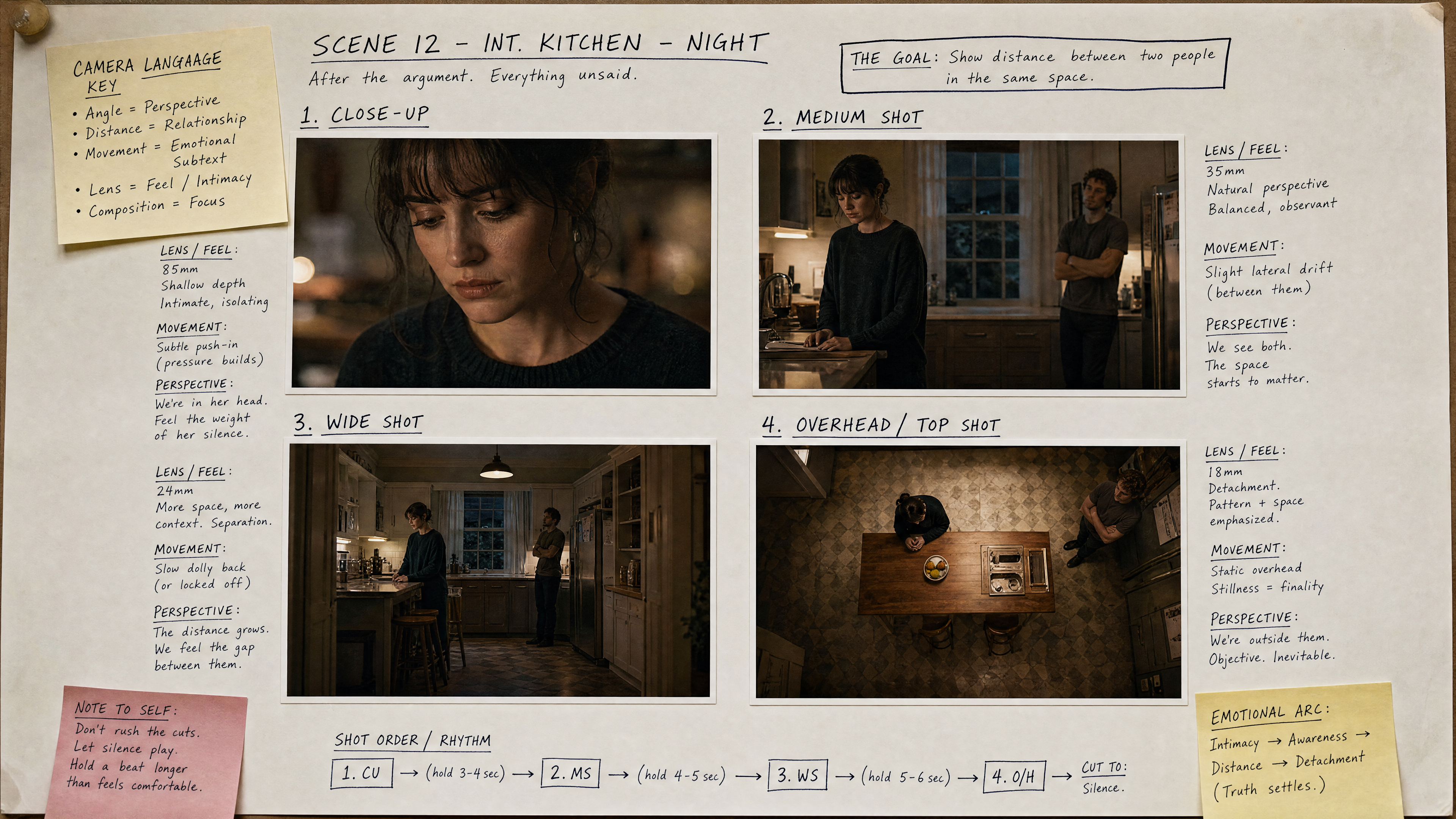
Leave those vague and the output drifts back toward generic cinematic content. Make them clear and the shot starts to look like something a person designed on purpose.
Want to direct your shots in one workflow? Build better AI film shots with 100 free credits →
Control Time, Because Video Is Not a Poster
A lot of creators still write a video prompt as if they were describing a single frame, and that is the core mistake. Motion needs a path through time, so a video prompt should cover four things: what the shot begins on, what changes in the middle, where it lands, and how quickly that change happens.
So instead of a flat description like this:
a woman stands in a hallway and looks afraid
write something with a path through it:
the elevator doors open, she steps forward once, hears something down the corridor, stops, and holds the silence for half a second before the cut
The first version hands the model a mood. The second hands it a shot.
Use Lighting Relationships Instead of Empty Style Words
Words like cinematic, epic, and masterpiece are not useless, but they are weak when they are carrying the whole prompt. It is stronger to define relationships between light sources:
- Cold window light against a warm practical lamp
- Sodium-orange street reflections under a blue dawn haze
- Soft top light across matte metal and dark glass
- Fluorescent green spill in a narrow corridor
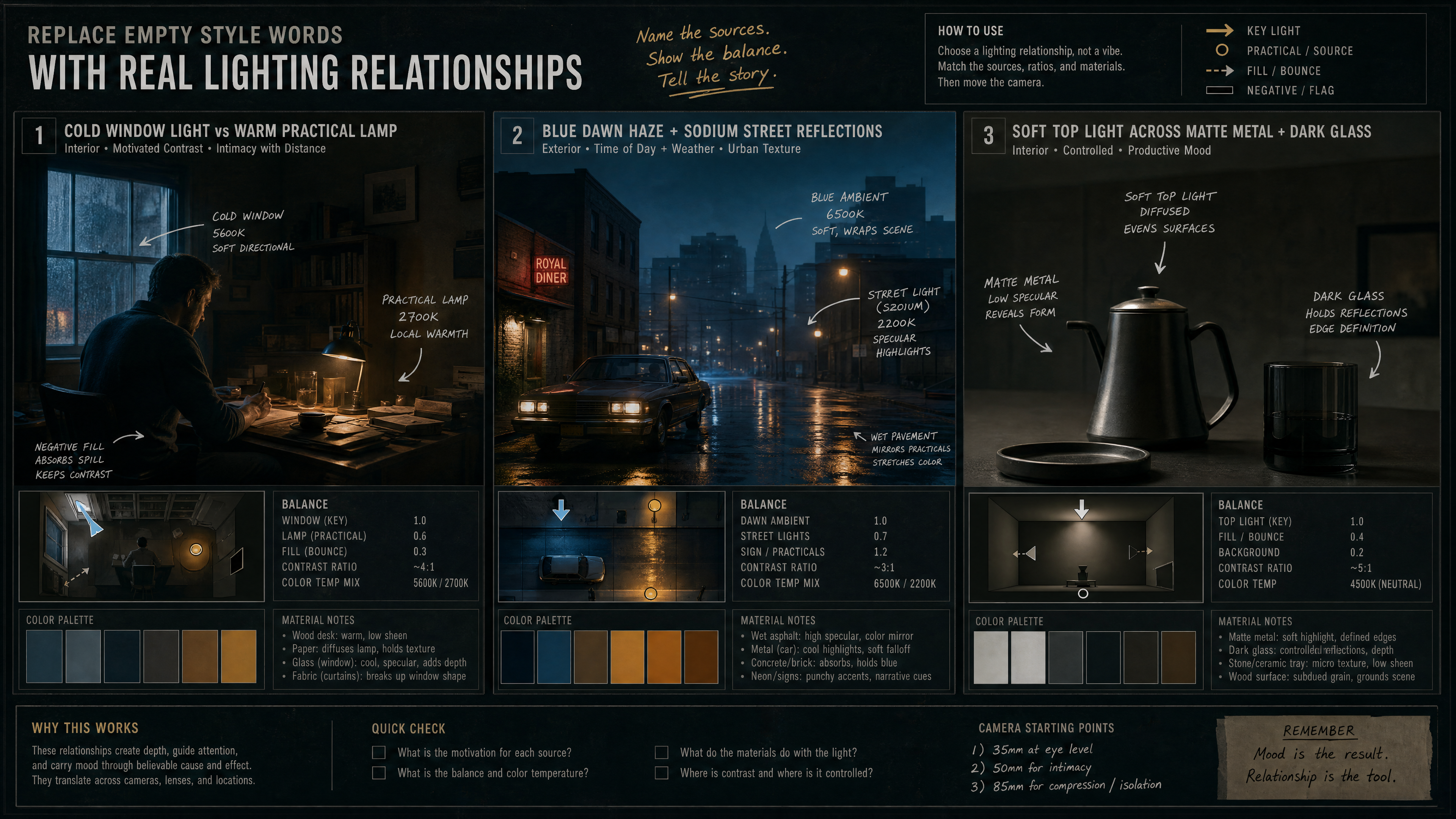
Relationships like these create visual discipline, and they make iteration easier, because you are adjusting real parts of the scene instead of stacking more taste words. This matters even more when you are after a precise style, such as an anime remake of a live-action emotional scene, a polished keynote-film product insert, or a restrained relationship-drama ending. The style holds together far better when the lighting logic underneath it is specific.
Build a Five-Shot Sequence Instead of One Overloaded Prompt
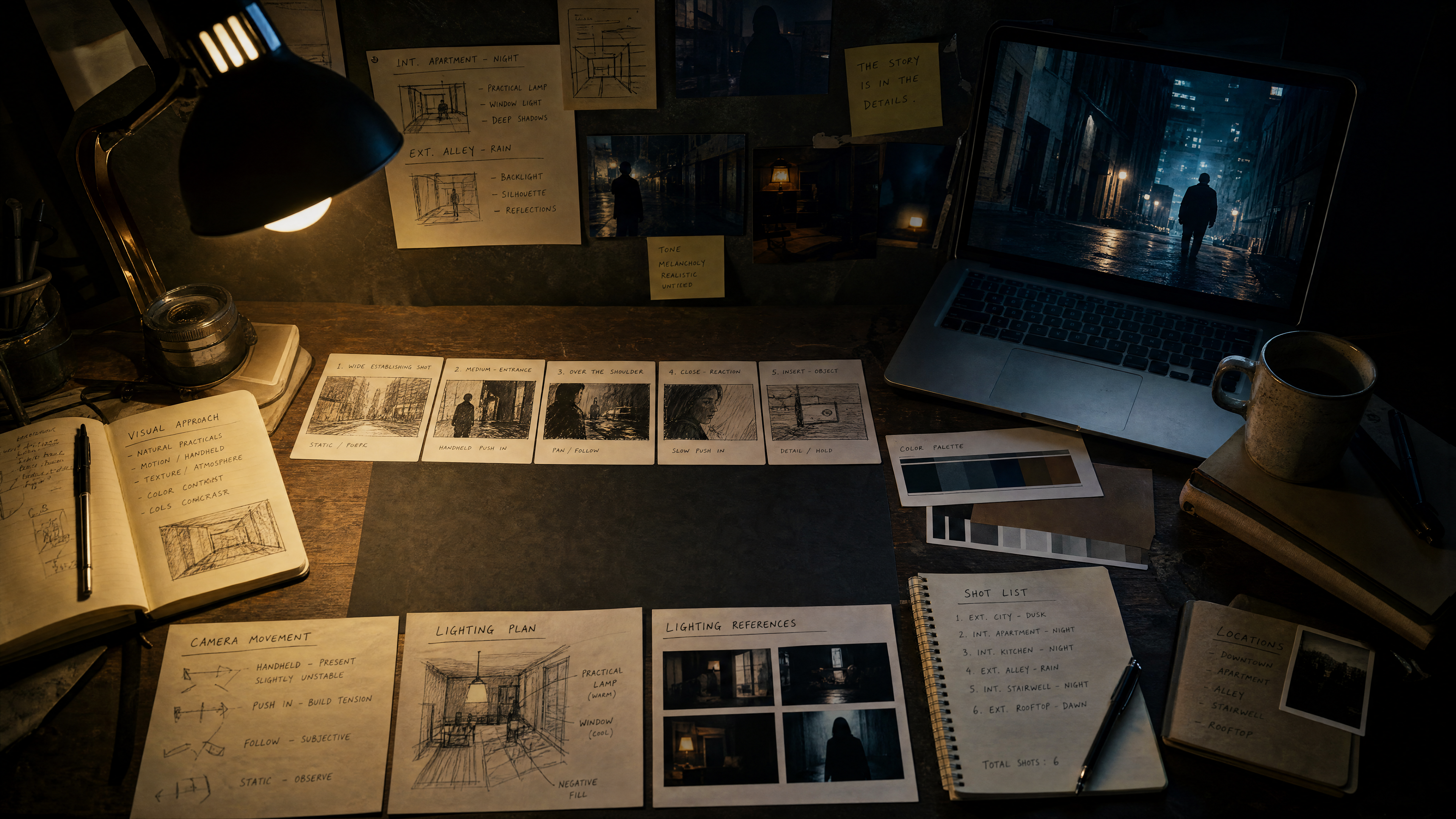
If you want an AI short film that actually cuts together, do not ask a single prompt to solve the whole scene. Split it into five jobs instead:
- Opening establishing shot
- Character introduction shot
- Emotional progression shot
- Insert detail shot
- Final lingering shot
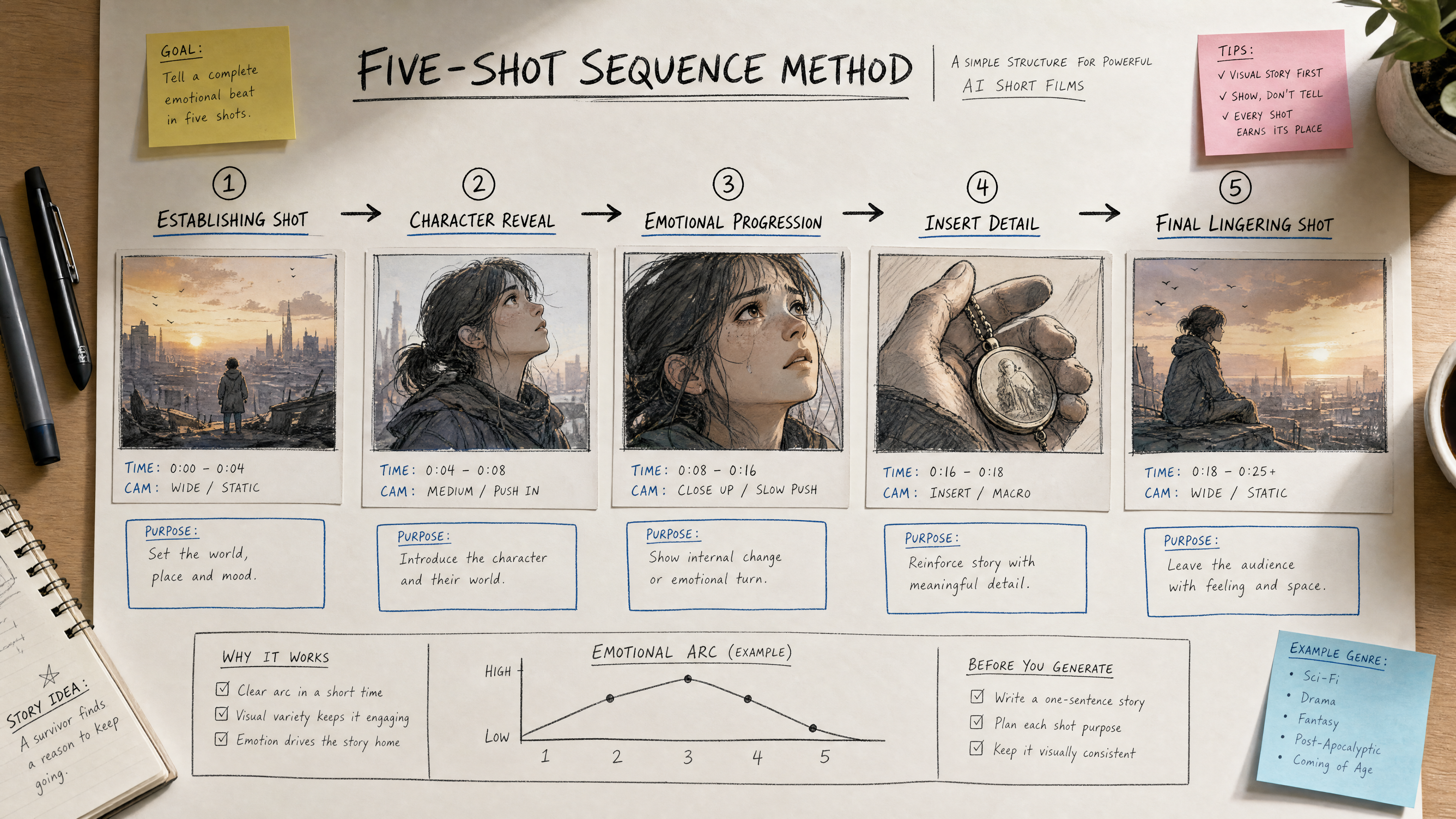
This works for both image and video. You can generate a hero still for each beat, then build matching motion prompts that carry the same visual logic forward. It also makes the edit easier, because every shot already knows why it exists.
Keep a Negative List So the Scene Does Not Drift
A strong movie prompt also tells the model what to stay away from. Exclusions worth keeping on hand:
- Avoid glossy commercial-ad polish
- Avoid extra background characters
- Avoid plastic, fake-looking skin
- Avoid overdesigned science-fiction interfaces
- Avoid exaggerated trailer energy when the scene should stay quiet
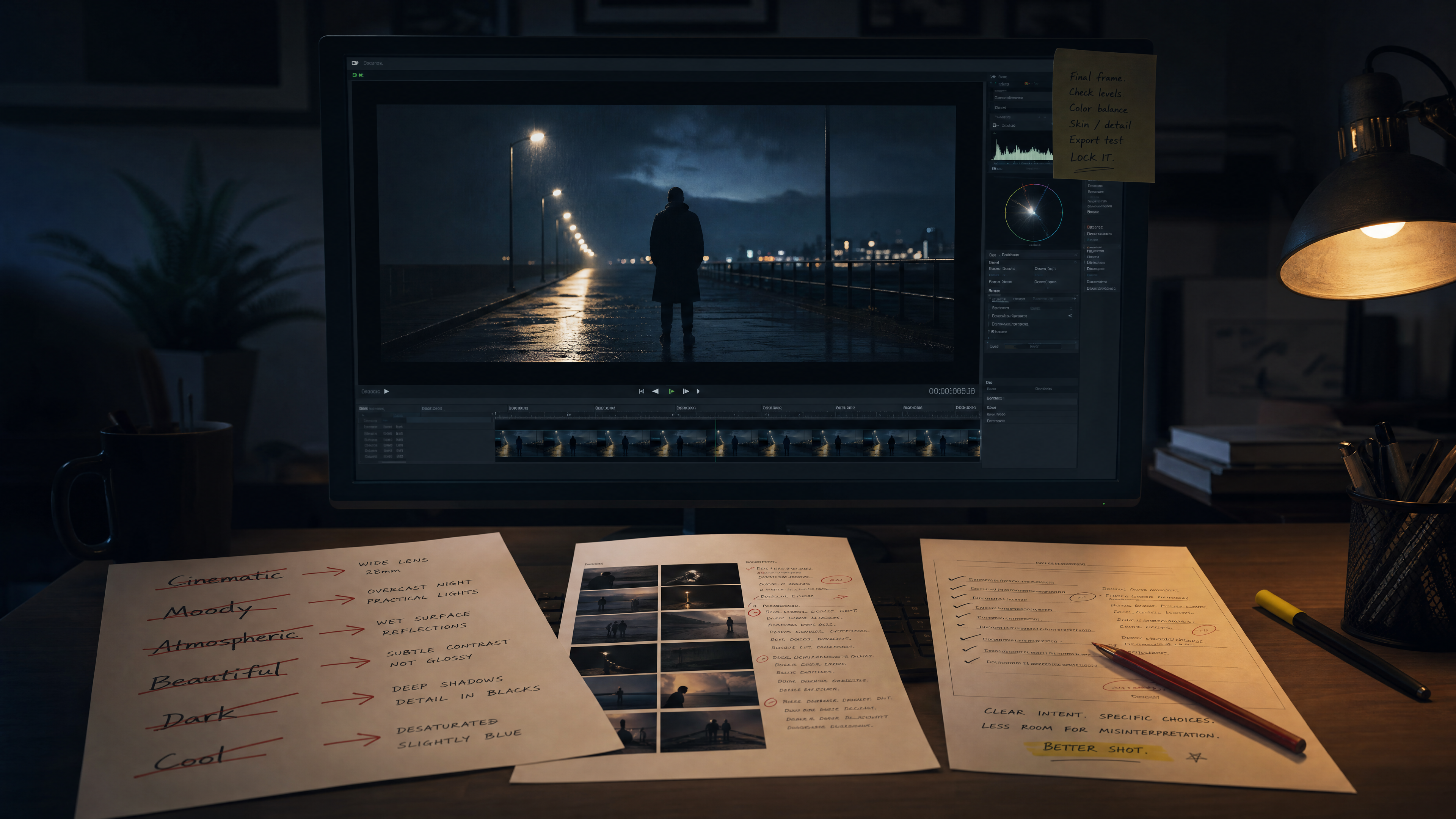
Negative controls are not just cleanup at the end; they are part of directing. They keep a moody scene from sliding into ad territory, and they stop a minimal product insert from turning into noisy tech wallpaper.
A Reusable Prompt Structure That Actually Works
Here is a structure worth reusing. Each line does a different job:
[shot job]
[subject + key action + environment]
[shot size + angle + camera movement + lens feel]
[lighting relationship + color behavior + atmosphere]
[material details + prop focus]
[how the shot starts, develops, and ends]
[what to avoid]
Because each line has a separate responsibility, the same skeleton flexes across very different outputs, from a melancholy city drama to an anime remake, a product keynote insert, a quiet domestic ending, or a suspense corridor reveal.
Turn One Idea Into a Full AI Film Workflow
The most useful question is not how to generate one cool shot. It is how to turn a single scene idea into a sequence of stills, motion beats, and assets you can actually publish. That is where Thank You AI earns its place: you can move from image-style exploration into sequence planning, and then into shot-specific video prompts, without losing the visual system of the scene along the way.
Ready to build a whole sequence, not one frame? Turn one scene idea into stills and motion with Thank You AI →
What Actually Makes a Prompt Feel Cinematic
What makes a prompt feel cinematic has little to do with how advanced the words sound. It is whether the shot feels directed. Once you have defined the purpose, the camera behavior, the timing, the lighting relationships, the material logic, and the exclusions, the output stops reading as generic AI content and starts behaving like something a filmmaker might actually choose to keep.
Start writing AI movie prompts that behave like real shots. Create your first shot sequence with Thank You AI →
常见问题
Frank is a growth-focused operations and marketing professional with expertise in product data engineering. He specializes in turning user insights into scalable growth strategies. At THANKYOU AI, he leads operations, marketing, and growth efforts, leveraging data to shape product decisions and connect innovation with the audiences that need it most.